I run Scribely — an AI-powered study tool that turns YouTube videos and PDFs into handwritten notes, flashcards, quizzes, and revision sheets. The product was built. The features worked. But nobody could find us on Google.
I had two options: hire an SEO agency for thousands of dollars a month, or figure it out myself. I chose a third option — I used Claude Code, Anthropic's AI coding assistant, to do the entire thing. Crawl my website, research keywords, analyze competitors, build a content strategy, and then write and deploy 27 SEO-optimized blog posts and a new landing page.
This is the full breakdown of how I did it, step by step, with the exact tools and setup I used. Everything here was done for free (or near-free).
What Is SEO and Why Should You Care?
Search Engine Optimization (SEO) is the practice of making your website more visible in search engine results. When someone types "YouTube to handwritten notes" into Google, SEO determines whether your site shows up on page 1 or page 50.
For a product like Scribely, SEO matters because:
- Organic traffic is free. Every visitor from Google costs nothing, unlike paid ads where you pay per click.
- Intent is high. Someone searching "best AI note-taking app" is actively looking for what you offer. They are far more likely to convert than someone who sees a random social media ad.
- It compounds. A blog post that ranks today keeps bringing traffic for months or years. Paid ads stop the moment you stop paying.
- It builds authority. A website with 50+ high-quality pages covering related topics signals to Google that you are a serious resource in your niche.
The core components of SEO are:
- On-page SEO — optimizing your actual content: titles, headings, meta descriptions, keyword usage, internal linking, page structure
- Technical SEO — site speed, mobile responsiveness, proper sitemaps, structured data (JSON-LD), canonical URLs, clean URL structure
- Off-page SEO — backlinks from other websites pointing to yours, social signals, brand mentions
- Content SEO — creating high-quality, keyword-targeted content that answers what people are actually searching for
Most startups and indie developers ignore SEO because it feels overwhelming. I was one of them — until I realized AI could handle 80% of the work.
What Is Claude and Claude Code?
Claude is an AI assistant built by Anthropic. It is one of the most capable large language models available, competitive with (and in many areas better than) GPT-4 and Gemini.
Claude Code is Anthropic's official command-line interface (CLI) for Claude. Unlike the web chat interface, Claude Code runs directly in your terminal and can:
- Read and write files on your local machine
- Run shell commands (git, npm, python, etc.)
- Edit code with precise find-and-replace operations
- Browse the web using connected tools
- Search Google using connected tools
- Work with your entire codebase — not just pasted snippets
Think of it as having a senior developer sitting next to you in the terminal, with the ability to read your entire project, understand the architecture, and make changes directly.
Claude Code is also available as a VS Code extension and a desktop app on Mac and Windows — so you can use it inside your IDE with full context of your open files and project structure.
How to Install Claude Code
Claude Code is available through multiple channels:
Option 1: NPM (Terminal CLI)
Open your terminal and run:
npm install -g @anthropic-ai/claude-code
Then start it in any project directory:
cd your-project-folder
claude
Option 2: VS Code Extension
Search for "Claude Code" in the VS Code extensions marketplace and install it. It gives you an AI assistant panel directly inside your editor with full access to your workspace files.
Option 3: Desktop App
Download the Claude Code desktop app from claude.ai/code for Mac or Windows. It provides a standalone interface that can connect to any folder on your machine.
Option 4: Web App
Use Claude Code directly at claude.ai/code in your browser — no installation needed.
All options give you the same core capabilities. I used the VS Code extension for this project because it gave me the best context — Claude could see my entire Next.js codebase, understand the file structure, and make edits in place.
You need an Anthropic account and a subscription plan that includes Claude Code. The Pro plan works.
The Secret Weapon: MCP Servers
Here is where it gets interesting. Claude Code by itself is powerful, but it is limited to your local files and terminal. To do SEO work, I needed Claude to:
- Browse my actual website — crawl pages, read content, check structure
- Search Google — find what keywords people search for, what competitors rank for, and what content gaps exist
This is where MCP (Model Context Protocol) servers come in.
What Is MCP?
MCP is an open protocol that lets AI assistants connect to external tools and data sources. Think of it like USB ports for AI — you plug in a "server" that gives the AI a new capability.
Claude Code supports MCP natively. You configure which MCP servers to use, and Claude gets access to their tools automatically.
MCP Server 1: Playwright (Free)
Playwright is a browser automation framework built by Microsoft. The Playwright MCP server gives Claude the ability to:
- Open a real web browser (Chromium)
- Navigate to any URL
- Read page content, take screenshots
- Click buttons, fill forms, scroll
- Inspect the DOM, read meta tags, check page structure
This is not a simple HTTP request — it launches an actual browser instance, so it renders JavaScript, loads dynamic content, and sees the page exactly as a user would.
How to set it up:
The Playwright MCP server is available as an npm package. In your Claude Code MCP configuration (usually in .claude/settings.json or through the Claude Code settings UI), add:
"mcpServers": {
  "playwright": {
    "command": "npx",
    "args": ["@playwright/mcp@latest"]
  }
}
Or use the CLI command:
claude mcp add playwright -- npx -y @playwright/mcp@latest
That is it. No API key needed. No paid subscription. Playwright is completely free and open source.
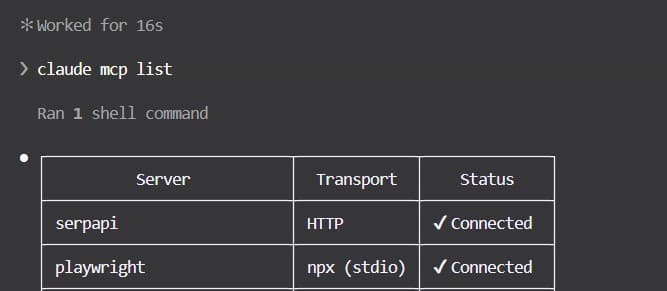
When Claude Code starts, it automatically connects to the Playwright MCP server and gets access to browser tools like browser_navigate, browser_snapshot, browser_click, browser_take_screenshot, and more.
MCP Server 2: SerpAPI (Free Tier)
SerpAPI is a service that lets you programmatically search Google and get structured results. The SerpAPI MCP server gives Claude the ability to:
- Search Google for any query
- Get organic results, "People Also Ask" questions, related searches
- See which pages rank for specific keywords
- Analyze competitor content and rankings
How to set it up:
- Go to serpapi.com and create a free account
- Copy your API key from the dashboard
- Add the SerpAPI MCP server to your Claude Code configuration:
"mcpServers": {
  "serpapi": {
    "command": "npx",
    "args": ["-y", "@anthropic-ai/mcp-server-serpapi"],
    "env": {
      "SERPAPI_API_KEY": "your-api-key-here"
    }
  }
}
Or use the CLI command:
claude mcp add serpapi --transport http --url https://mcp.serpapi.com/YOUR_SERPAPI_API_KEY/mcp
The free tier gives you 250 searches per month — more than enough for an SEO audit and keyword research session.
How They Connect Together
The setup works like this:
You (in terminal/VS Code)
  → Claude Code (AI brain)
    → Playwright MCP (browser eyes — crawls your site)
    → SerpAPI MCP (Google search — finds keywords and competitors)
    → Local filesystem (reads/writes your code and content)
Claude orchestrates everything. You give it a high-level instruction like "audit my website for SEO," and it:
- Uses Playwright to open your website in a real browser
- Navigates through every page, reading content and structure
- Uses SerpAPI to search Google for relevant keywords
- Analyzes the gap between what people search for and what your site offers
- Writes the results directly into files in your project
No copy-pasting between tools. No switching between tabs. Claude handles the entire pipeline.
Phase 1: Crawling My Website
The first thing I asked Claude to do was crawl my entire website and understand what content already existed.
Claude used the Playwright MCP to:
- Navigate to every page on scribely.site
- Read the page title, meta description, headings, body content
- Check the URL structure and internal links
- Save everything to markdown files for analysis
It visited the homepage, the blog index, every individual blog post (31 at the time), the tools pages, the pricing page, and the about page. For each page, it saved:
- The URL and page title
- The meta description
- All H1, H2, and H3 headings
- The full body text
- Internal and external links
- Any structured data (JSON-LD)
This gave Claude a complete picture of my site's current content landscape — what topics were covered, what keywords were targeted, and what was missing.
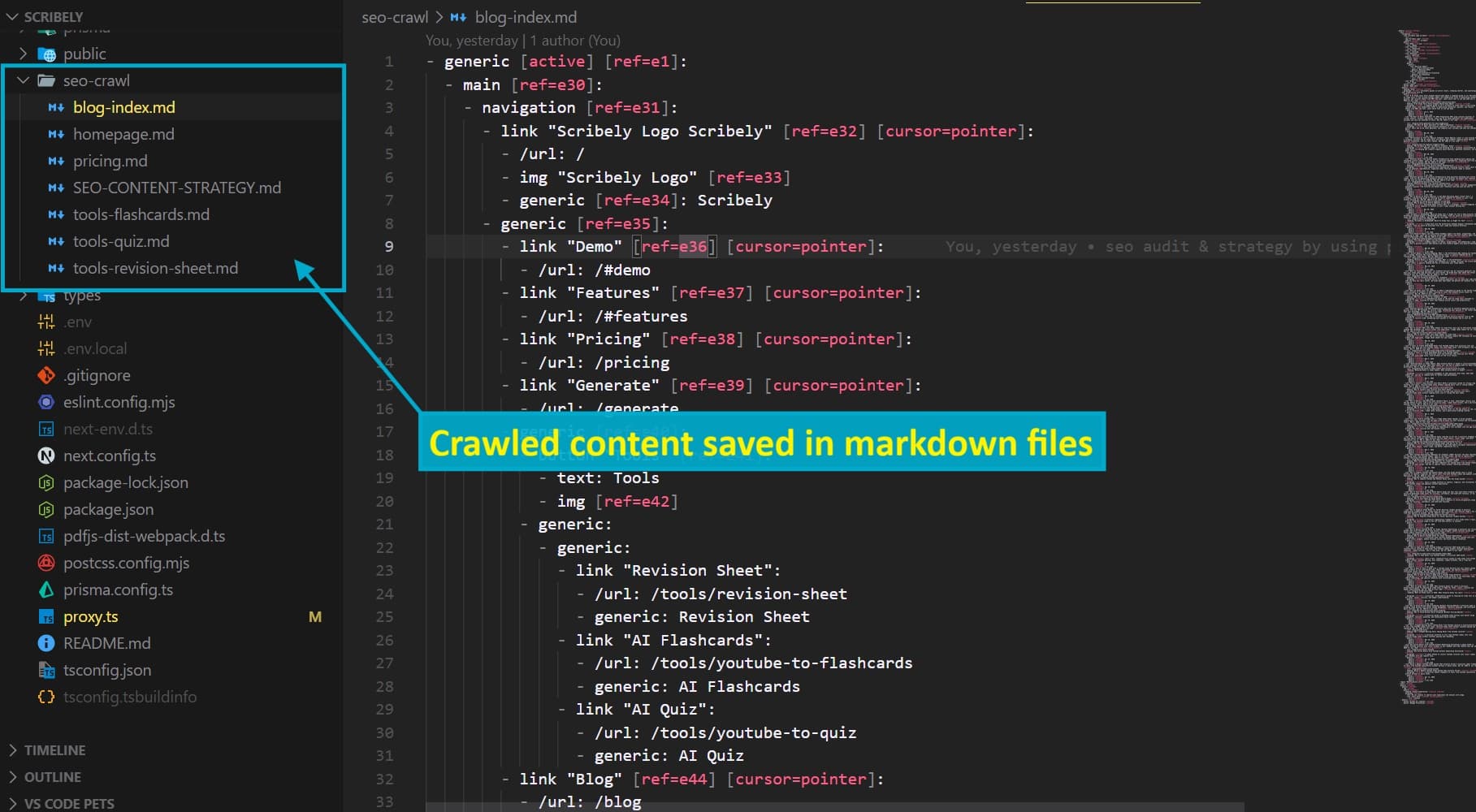
Time to crawl the entire site: about 5 minutes.
Doing this manually would have taken hours. An SEO agency would charge you for a "content audit" that produces essentially this same output.
Phase 2: Keyword Research with SerpAPI
With the site content mapped, I asked Claude to research keywords relevant to Scribely's niche: AI study tools, note-taking, YouTube summarization, flashcard generation, etc.
Claude used the SerpAPI MCP to search Google for dozens of queries:
- "YouTube to handwritten notes"
- "AI note-taking app"
- "best YouTube video summarizer for students"
- "AI flashcard generator"
- "PDF to notes AI"
- And many more variations
For each search, Claude analyzed:
- Which competitors rank on page 1 — NoteGPT, Knowt, Mindgrasp, NotebookLM, etc.
- What type of content ranks — comparison posts, how-to guides, listicles, tool pages
- "People Also Ask" questions — real questions people type into Google, revealing search intent
- Related searches — keyword variations and long-tail opportunities
- Content gaps — queries where no one has a great answer yet
This is exactly what professional SEO tools like Ahrefs, SEMrush, and Moz do — except I did it through Claude for free using SerpAPI's free tier.
What We Found
The research revealed several important insights:
High-opportunity keywords with low competition:
- "YouTube to handwritten notes" — our exact product, but we had no dedicated page targeting it
- "AI handwritten notes generator free" — high search volume, mostly answered by font converters, not AI study tools
- "Scribely vs NoteGPT" — branded comparison searches that we should own
Content types that rank:
- Comparison posts ("X vs Y") rank extremely well for buying-intent keywords
- "How to" guides with specific, actionable steps
- Listicles ("5 best tools for...") for discovery-phase searches
- Niche-specific content ("AI study tools for nursing students") with lower competition
Competitor weaknesses:
- Most competitor blogs focus on generic AI content, not study-specific use cases
- Very few competitors have handwritten notes as a differentiator
- Niche student segments (law, nursing, engineering) are underserved
Phase 3: Building the SEO Content Strategy
Based on the crawl data and keyword research, Claude built a comprehensive content strategy document. It prioritized 25 content pieces across three tiers:
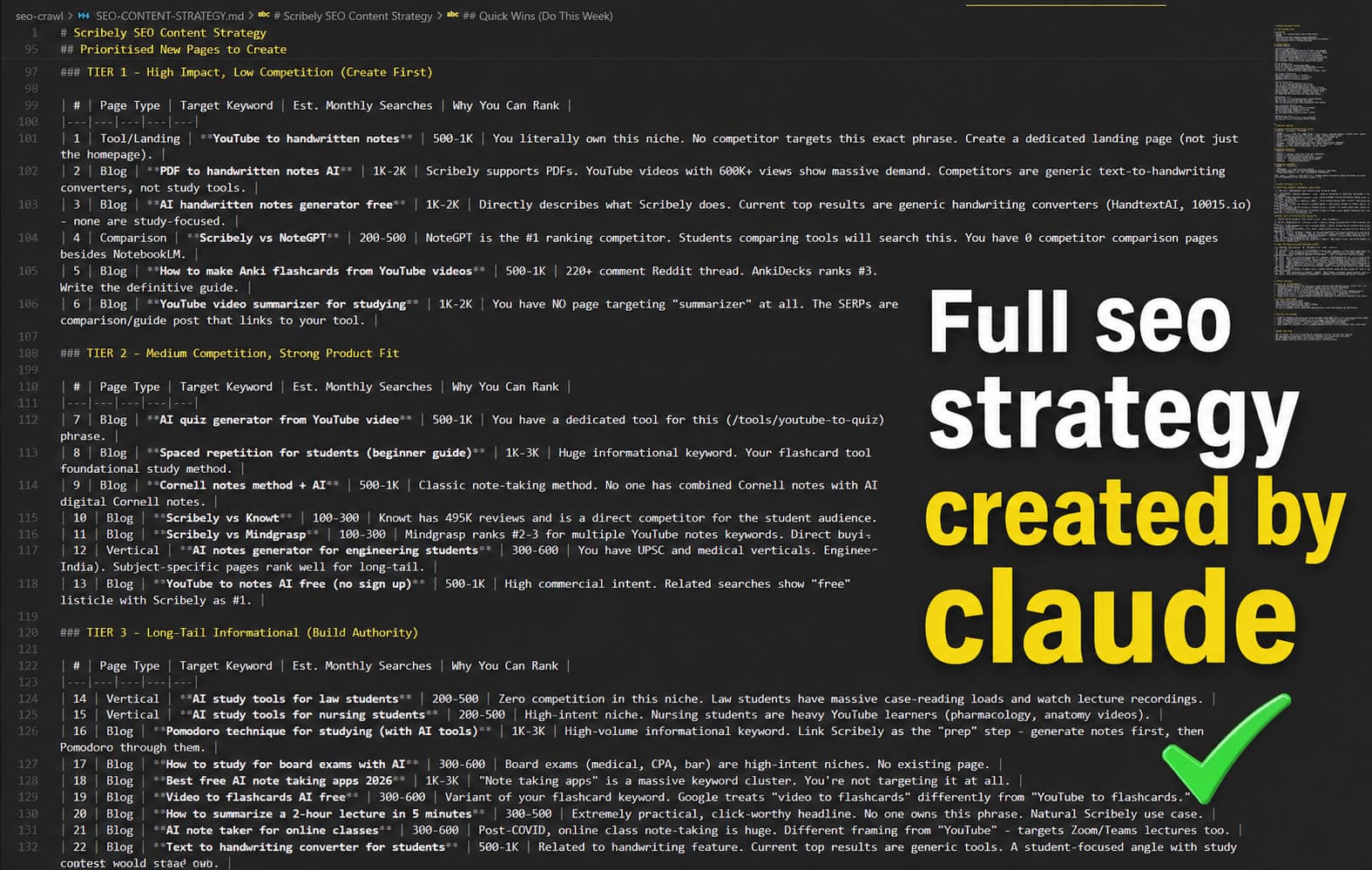
Tier 1: High-Impact Pages (6 pieces)
These target the highest-volume, most commercially relevant keywords:
- "YouTube to Handwritten Notes: How AI Turns Lectures into Study-Ready Pages"
- "PDF to Handwritten Notes: How AI Converts Documents into Study Material"
- "Best Free AI Handwritten Notes Generator for Students"
- "Scribely vs NoteGPT: Which AI Note-Taker Actually Helps You Study?"
- "How to Make Anki Flashcards from YouTube Videos"
- "7 Best YouTube Video Summarizers for Students"
Tier 2: Authority Builders (6 pieces)
These target medium-volume keywords and build topical authority:
- "Spaced Repetition for Students: The Beginner's Guide"
- "Cornell Notes Method + AI: The Modern Way to Take Study Notes"
- "Scribely vs Knowt" and "Scribely vs Mindgrasp" comparison posts
- "The Best AI Notes Generator for Engineering Students"
- "YouTube to Notes AI Free: 5 Tools That Actually Work"
Tier 3: Long-Tail Coverage (12 pieces)
These target specific niches and long-tail keywords:
- "AI Study Tools for Law Students" and "AI Study Tools for Nursing Students"
- "How to Study for Board Exams with AI"
- "Pomodoro Technique + AI Study Tools"
- "Feynman Technique + AI"
- "Best AI Note Taker for Online Classes"
- And several more niche topics
Bonus: Quiz-Focused Content (3 pieces)
After the initial strategy, I also had Claude create content targeting quiz generation:
- "AI Quiz Generator from YouTube Videos"
- "Best AI Quiz Makers for Exam Prep"
- "Turn PDF into Practice Test with AI"
The strategy document included keyword targets, search intent analysis, recommended content structure, and internal linking plans for each piece.
Phase 4: Implementation — Writing 27 Blog Posts
This is where Claude Code really earned its keep. Writing 27 high-quality, SEO-optimized blog posts manually would take weeks. Claude wrote all of them in a single session.
How Claude Wrote Each Post
For each blog post, Claude:
- Followed the keyword strategy — used the target keyword in the title, H1, first paragraph, and naturally throughout the content
- Structured for SEO — proper heading hierarchy (H2, H3), short paragraphs, scannable formatting with bullet points and bold text
- Added internal links — every post links to relevant Scribely tools (handwritten notes, flashcards, quizzes, revision sheets) and to other blog posts on related topics
- Included FAQ sections — targeting "People Also Ask" snippets with question-and-answer formatting
- Added JSON-LD FAQ schema where appropriate — structured data that helps Google understand and feature the content
- Wrote compelling meta descriptions — under 160 characters, keyword-rich, with a clear value proposition
- Avoided common SEO mistakes — no keyword stuffing, no thin content, no duplicate content across posts
What Made the Posts Good
Claude did not just churn out generic AI content. Each post was:
- Genuinely useful — real advice, specific workflows, actionable steps
- Product-aware — naturally integrated Scribely's features where relevant, without being salesy
- Technically accurate — correct information about study methods (spaced repetition, Cornell method, Feynman technique, Pomodoro)
- Properly formatted for our MDX system — Claude understood our Next.js blog architecture, the MDX component overrides, and the frontmatter format
Phase 5: The Landing Page
Beyond blog posts, Claude also built a dedicated SEO landing page at /tools/youtube-to-handwritten-notes.
This page targets the highest-value keyword — "YouTube to handwritten notes" — with:
- A keyword-rich H1 and hero section
- The actual note generator embedded on the page (same tool as the main generator)
- A "How It Works" section with a 3-step breakdown
- A 6-card feature grid
- JSON-LD FAQ schema for 8 common questions
- Cross-tool CTAs linking to flashcards, quizzes, and revision sheets
- Full SEO metadata, Open Graph tags, and canonical URL
The page is both an SEO asset (designed to rank for the target keyword) and a functional tool page (users can generate notes directly on it).
Phase 6: Internal Link Optimization
After creating all the content, the final step was internal link optimization. Claude updated links across all 26 blog posts to point to the new /tools/youtube-to-handwritten-notes landing page instead of the generic /generate route.
Why? Both pages have the exact same generator embedded. But the landing page is the one optimized to rank for "YouTube to handwritten notes." By pointing all internal links to it, we:
- Concentrate link equity — Google sees dozens of internal links pointing to one URL, signaling it is an important page
- Boost keyword relevance — the URL itself contains the target keyword
- Create a clear site hierarchy — blog posts support the landing page, the landing page drives conversions
The only exceptions were 2 blog posts specifically about PDF-to-notes workflows, which kept linking to the general generator since the landing page URL says "youtube-to-handwritten-notes."
The Results: What Changed
Before this project:
- 31 blog posts covering general study tips and AI tools
- No keyword-targeted content — posts were written for existing users, not search traffic
- No dedicated tool landing pages — just a generic
/generateroute - Minimal internal linking — posts existed in isolation
After:
- 58 blog posts covering targeted keywords across 3 tiers of search intent
- 1 SEO-optimized landing page targeting the highest-value keyword
- Dense internal linking — every post links to relevant tools and other posts
- FAQ schema on key pages for Google featured snippet eligibility
- Complete topical coverage — from beginner study tips to niche student segments
The content went from a collection of isolated posts to a content ecosystem where every piece supports every other piece and funnels toward the core product pages.
What I Learned
AI Does Not Replace SEO Knowledge — It Amplifies It
Claude Code did not "do my SEO for me" blindly. I needed to understand what good SEO looks like to guide the process:
- Knowing which keywords to target (commercial vs. informational intent)
- Understanding how internal linking builds authority
- Recognizing when comparison posts need less competitor praise
- Deciding whether to consolidate routes or keep them separate
The AI handled the execution — the crawling, the research, the writing, the code changes. But the strategic decisions were still mine.
MCP Servers Are a Game Changer
The Playwright + SerpAPI combination gave Claude real-world context that no amount of prompting can replace. Instead of asking Claude to "guess" what my website looks like or "imagine" what Google results show, it actually looked. Real data in, real strategy out.
The Cost Was Essentially Zero
- Claude Code: Included in my existing Anthropic Pro subscription
- Playwright MCP: Free and open source
- SerpAPI: Free tier (250 searches/month)
- Total additional cost: $0
An SEO agency would charge $500-$2,000/month for similar work. A freelance SEO content writer charges $50-$150 per blog post. Twenty-seven posts alone would cost $1,350-$4,050.
Speed Was Absurd
The entire project — from initial crawl to 27 published blog posts and a landing page — was completed in a single extended working session. Not weeks. Not days. One session.
This does not mean the content was rushed. Each post is 1,500-3,000+ words, properly structured, technically accurate, and genuinely useful. Claude Code just works fast when it has clear direction.
How to Replicate This for Your Own Website
If you want to do the same thing for your website, here is the playbook:
Step 1: Set Up Claude Code + MCP Servers
Install Claude Code (npm, VS Code extension, or desktop app). Configure the Playwright and SerpAPI MCP servers as described above. Total setup time: 15 minutes.
Step 2: Give Claude This Prompt
Once your MCP servers are connected, paste this prompt into Claude Code. Replace the placeholder with your actual website URL:
I want you to develop a complete SEO growth plan for my website: **[YOUR WEBSITE URL]**.

Start by using Playwright to crawl the entire site and export the pages
into local markdown files. Analyze the existing content structure, topics,
and pages to understand what has already been covered.

Next, perform keyword and competitor research using SerpAPI. Identify
relevant search terms in my niche, analyze the current search results,
discover common user questions, and examine the content strategies of
competing websites.

After gathering both datasets, compare my existing content with the
opportunities you uncover. Identify content gaps, missing topics, and
untapped keywords.

Finally, provide a prioritized content roadmap that includes:

- Recommended pages or articles to create
- Primary target keyword for each page
- Estimated monthly search volume
- Search intent
- Ranking difficulty or competition level
- The reason my website has a realistic opportunity to rank

The goal is to build a data-driven SEO strategy that focuses on the
highest-impact opportunities first and helps grow organic traffic over time.
Claude will take it from here — crawling your site, searching Google, analyzing competitors, and building your full strategy document. You can then ask it to start writing and implementing the content.
Step 3: Review and Execute
Review the strategy Claude produces. Ask it to start writing content, beginning with Tier 1 (highest impact). Review each piece for accuracy, tone, and product alignment. Push to production.
Step 4: Monitor and Iterate
Submit your updated sitemap to Google Search Console. Monitor rankings and traffic over the following weeks. Use the data to identify what is working and create more content in those areas.
Frequently Asked Questions
Do I need coding knowledge to use Claude Code for SEO?
Basic familiarity with the terminal helps, but Claude Code explains what it is doing at each step. If you can navigate to a folder and type a command, you can use it. The VS Code extension makes it even more accessible.
Is the content Claude writes good enough to rank?
Yes — if you guide it well. Claude produces well-structured, genuinely informative content. The key is giving it clear direction on keywords, audience, tone, and product positioning. Review the output and make adjustments where needed.
Will Google penalize AI-generated content?
Google has stated that it evaluates content based on quality and usefulness, not whether it was written by a human or AI. The key is that the content must be helpful, reliable, and people-first. Generic, thin AI content will not rank. Well-researched, well-structured content that genuinely helps the reader will — regardless of who or what wrote it.
How long before I see SEO results?
SEO is a long game. New content typically takes 2-8 weeks to get indexed and start ranking. Meaningful traffic growth usually appears within 2-4 months. The advantage of publishing many high-quality pieces at once is that you build topical authority faster than publishing one post at a time.
Can I use this approach for any type of website?
Yes. The methodology — crawl, research, strategize, execute — works for any website. SaaS products, e-commerce stores, personal blogs, agency sites, portfolios. The specific keywords and content types change, but the process is the same.
What if I do not have an Anthropic subscription?
Claude Code requires an Anthropic account with a plan that includes Claude Code access. The Pro plan is sufficient. The cost is far less than any SEO tool subscription (Ahrefs is $99/month, SEMrush is $139/month) and you get a general-purpose AI assistant, not just an SEO tool.
But do not worry — there are ways to run Claude Code for absolutely free, without paying for any subscription. I will cover exactly how to set that up in an upcoming blog post. Stay tuned.
SEO does not have to be expensive, slow, or mysterious. With Claude Code and two free MCP servers, I went from zero SEO strategy to 27 targeted blog posts, a landing page, and a complete content ecosystem — in one session. The tools exist. The process works. The only question is whether you will use them.